experiment-php-solid-client
Solid OIDC Client Examples
This project provides various examples related to accessing a protected resource on a Solid Pod.
This includes examples of:
- Fetching a WebID Profile
- OpenID Connect (OIDC) Issuer Discovery
- OIDC Authorization Code Flow
- Accessing a protected resource
- Accessing a private resource without an online user
Full Flow
The full flow is:
-
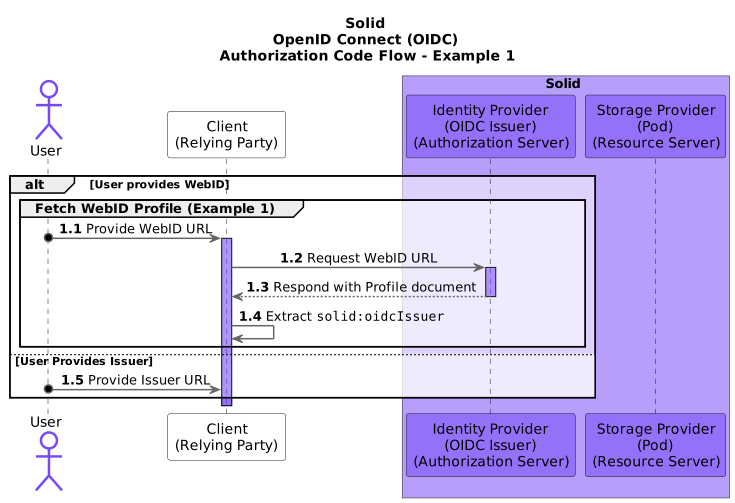
Fetching a WebID Profile
- The User provides the Client (the “Relying Party”) with a WebID URL.
- The Client fetches the WebID Profile from the provided URL.
-
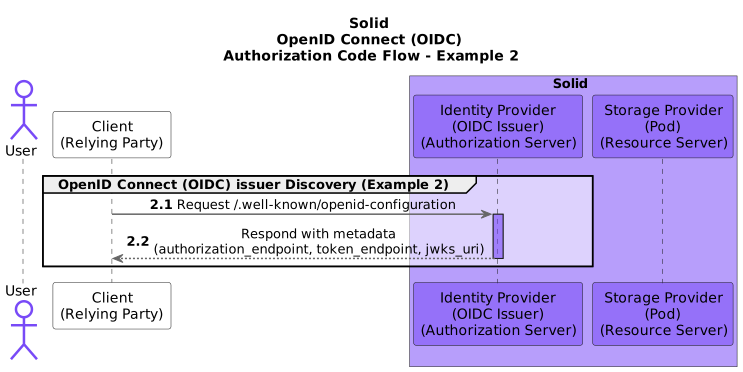
OpenID Connect (OIDC) Issuer Discovery
- The Client extracts the OIDC Issuer URL (
http://www.w3.org/ns/solid/terms#oidcIssuer) from the fetched WebID Profile. - The Client fetches the configuration of the OpenID Provider (the “Authorization Server”) from the discovery URL (
/.well-known/openid-configuration) of the extracted OIDC Issuer URL.
- The Client extracts the OIDC Issuer URL (
-
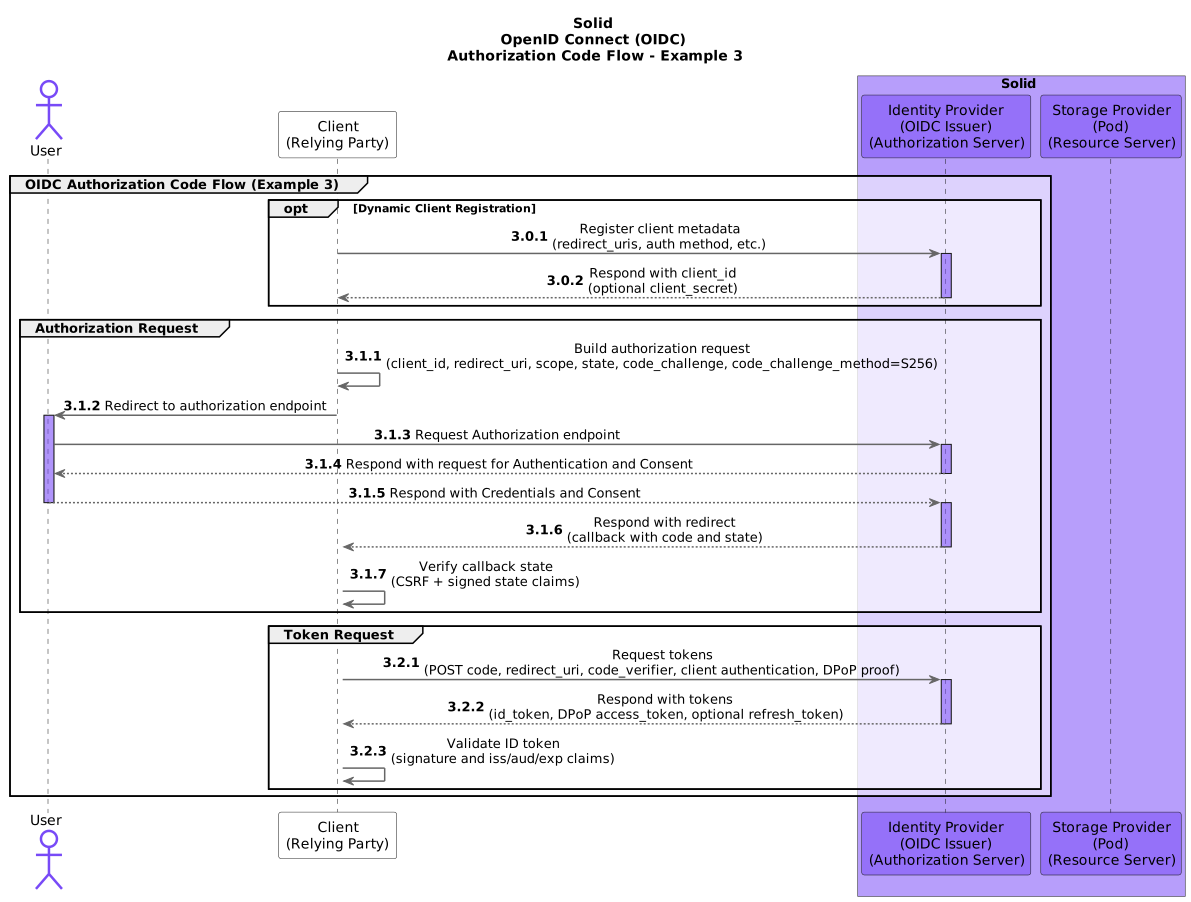
OIDC Authorization Code Flow
- The Client prepares an (Authorization Code Grant) Authentication Request using the OpenID Provider’s metadata from the fetched configuration.
- The Client includes a signed
statevalue (for CSRF protection) and PKCE (code_challengeandcode_challenge_method=S256) in the authorization request. - The Client sends the User to the OpenID Provider, using the prepared Authentication Request.
- The OpenID Provider asks the User to authenticate and provide consent for the Client to access (data on) their Solid Pod.
- The OpenID Provider redirects the User back to a URL on the Client (the “callback” URL), with an Authorization Code.
- The Client validates the returned
stateand exchanges the Authorization Code at the token endpoint using client authentication, PKCEcode_verifier, and a DPoP proof. - The Client makes a request to the OpenID Provider’s Token Endpoint (as described by the fetched OpenID Provider metadata) using the Authorization Code received in the callback.
- The OpenID Provider responds to the Client with an ID Token, an Access Token, and (optionally) a Refresh Token.
- The Client validates the received ID token and extracts the End-User’s “Subject Identifier” (the identifier of the User at the OpenID Provider, usually the WebID).
-
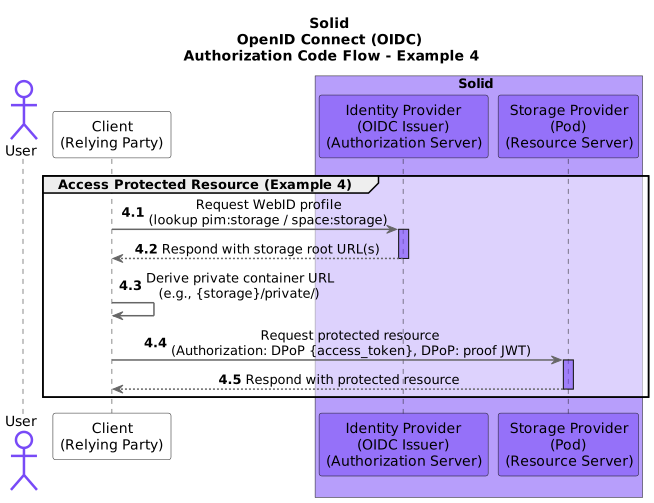
Accessing a protected resource
- The Client reads the authenticated WebID profile and determines the Pod storage location (for example
pim:storageorspace:storage), then derives a protected container URL (for example/private/). - The Client uses the DPoP-bound Access Token to request a protected Solid resource using
Authorization: DPoP <access_token>and aDPoPproof header.
- The Client reads the authenticated WebID profile and determines the Pod storage location (for example
-
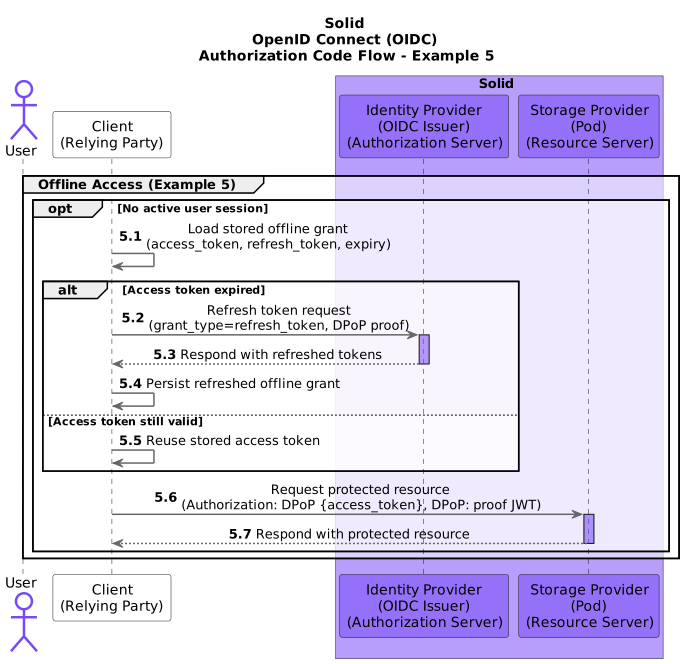
Accessing a private resource without an online user
- After initial consent, the Client stores an offline grant (access token, refresh token, and expiry) for a given issuer and WebID.
- When no user session is active, the Client reuses a still-valid access token or refreshes it with the refresh token at the token endpoint (with DPoP proof).
- The Client can then fetch the protected Solid resource without an interactive login.